

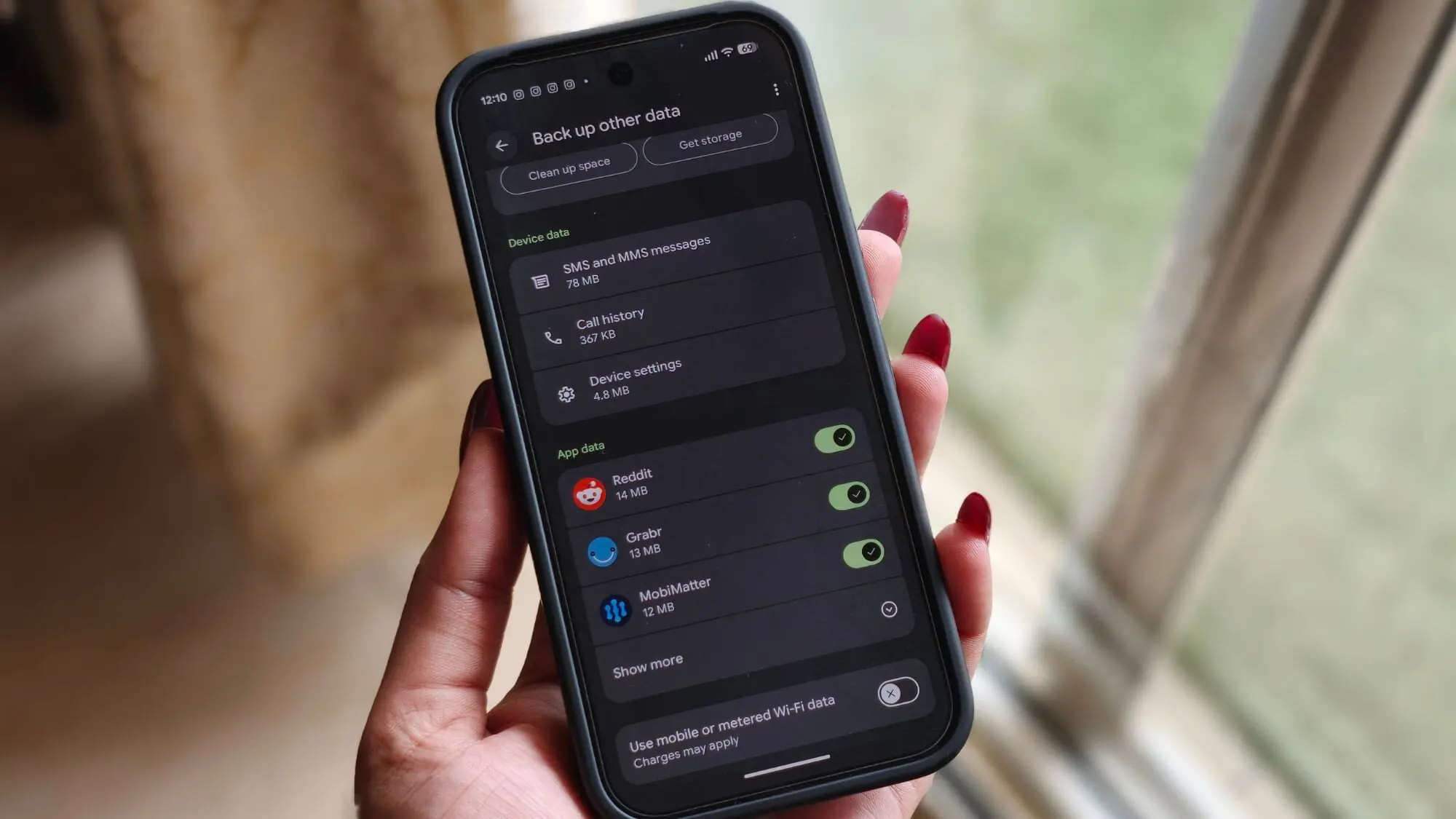
Google has begun sending email notifications to Android users regarding a major upcoming change to its backup storage policy, providing a 45-day window before the new rules go into effect. The move comes after the company quietly prepared for the transition earlier this month, when it was spotted rolling out updated backup controls alongside the policy shift.
What Is Changing About Android Backups?
Currently, many components of Android device backups—such as SMS messages, call history, device settings, and app data—are stored without impacting the user's Google Account storage quota. However, starting in approximately 45 days, all data included in Android device backups will count toward the user's storage limit. This aligns with the existing practice for Google Photos uploads and MMS messages, which already consume storage.
The email notification clarifies that the policy update applies to a broad range of backed-up data, including SMS messages (texts), call history, device settings (like Wi-Fi passwords, display preferences, and accessibility settings), app settings, and other configuration data. Essentially, if it is part of an Android device backup, it will soon occupy space in the user's Google Account storage.
Potential Impact on Users
For the vast majority of Android users, the change is expected to have a negligible effect on their storage usage. In the email, Google provides an estimate of how much additional storage the backup will require. For example, one user received a notice stating that their backup size would increase by only 0.03 GB (approximately 30 MB). This aligns with earlier reports by Android Authority, which cited an average increase of around 40 MB. For context, a typical Google Account comes with 15 GB of free storage, shared across Gmail, Google Drive, and Google Photos. An extra 30-40 MB is a tiny fraction of that quota.
However, users who are already close to their storage limit—due to large photo libraries, many emails, or extensive Drive files—could face interruptions. If an account exceeds its storage limit after the policy change, automatic Android backups will be paused until the user frees up space or upgrades to a paid Google One storage plan. This could be problematic for those who rely on backups to protect their data in case of device loss or upgrade.
New Granular Backup Controls
To help users manage the change, Google is introducing more detailed backup controls for devices running Android 9 or later. Previously, users could only toggle the entire backup feature on or off. Now, they can choose exactly which types of data and which individual apps are included in their backups. This means a user can, for instance, exclude SMS messages or specific app data they don't need, reducing storage consumption and gaining finer control over what gets restored on a new device.
The granular controls are accessible in the device's settings under Backup (typically in System or Google settings). Users will see a list of categories—such as Call History, Device Settings, App Data, SMS, and others—with toggles for each. Additionally, some apps that support backup will appear individually, allowing exclusion of their data. This feature is rolling out alongside the policy notification and is expected to be available globally within the coming days.
Background and Historical Context
Google's backup service for Android has long been a convenient but vaguely defined feature. Since Android 6.0 (Marshmallow), the platform has supported full backup of app data, device settings, and other data to Google Drive. Historically, this backup did not count toward the user's storage quota, partly because Google wanted to encourage users to enable backups without fear of eating into their free space. Over time, as the company sought to monetize storage through Google One, it began charging for certain types of data (like Photos in original quality). The Android backup change follows this trend, consolidating all backup types under the same storage umbrella.
The shift is also part of a broader strategy to simplify storage management. By having all backup data count toward the same quota, Google can offer a more consistent experience across services. Users can monitor their backup storage through the Google One app or the device's backup settings, where a percentage breakdown is shown. This integration also helps Google One subscribers understand the value of their paid storage, as the backup can potentially consume significant space for heavy users.
Detailed Analysis of the Change
Why Now?
The timing of the change—July 2026—may be influenced by several factors. Firstly, Google has been gradually shifting its storage policies over the past few years to drive adoption of Google One subscriptions. The Android backup policy was one of the last major free storage exemptions. Secondly, with the rise of cloud computing and increasing data sizes (e.g., high-resolution photos, larger apps), the cost of storing backups has risen. By aligning backups with the storage quota, Google can better control infrastructure costs while offering users a clear path to expand storage if needed.
How Much Storage Will Backups Actually Use?
According to Google's own estimates, the average Android backup size increase is only about 30-40 MB. This is because SMS and call history are text-based and consume negligible space, and device settings (like Wi-Fi passwords) are small files. App data can be more variable: some apps (like games) may have large data stores, but often the backup only includes configuration files, not cached media. Therefore, the worst-case scenario for a user with many large apps might see an increase of a few hundred megabytes, but that is still modest compared to a typical 15 GB free tier.
Users who have multiple Android devices backing up to the same account will see cumulative storage usage. For example, if you have a phone and a tablet, each backup adds 30-40 MB, totaling 60-80 MB. That is still minimal. However, over years of backups, the storage can accumulate if old backups are not cleaned up. Google retains multiple backup snapshots—the most recent ones for each device—but older ones may be deleted automatically after 57 days of inactivity, as per current policy. It's unclear if this retention policy will change with the new storage counting, but for now, it remains the same.
What Happens When Storage Runs Out?
If a user's account exceeds its storage limit after the policy change, the email warns that automatic Android backups will pause. This means no new backup will be created until either the user frees up space (by deleting old backups, clearing Drive files, or cleaning Gmail) or upgrades to a paid Google One plan. The paused backup does not affect existing backups; they remain intact until the user manually deletes them or they age out. However, the device will not prioritize new backups, potentially leaving recent data unprotected.
Google provides a way to monitor usage: through the Google One storage manager, users can see how much space each service (including Android backups) consumes. They can also manually trigger a backup deletion or disable backups entirely if they wish. The granular controls also help reduce future storage consumption by excluding non-essential data.
Comparison with Competitors
Other mobile ecosystems handle backups differently. Apple's iCloud backups for iOS count toward the user's iCloud storage limit (5 GB free). Similarly, Samsung's backup service (Samsung Cloud) provides a small amount of free storage and charges for more. Google's move brings Android more in line with industry standards. However, Android's advantage was the free nature of backups; losing that may frustrate some users. On the other hand, the negligible size increase means the practical impact is minimal for most, and the new controls improve user choice.
What Users Should Do Now
If you receive the email from Google, you have several options:
- Check your current storage usage: Open the Google One app or visit Settings > Accounts > Google > Manage storage on your device. This shows how much space you have left and how much backups will add.
- Review granular controls: On Android 9+, go to Settings > System > Backup (or Google > Backup). Look for new toggles for each data type. Uncheck anything you don't need backed up, such as SMS or call history, to minimize storage impact.
- Clean up old backups: In the Google One storage manager, under 'Android backup', you can see the list of devices and their backup sizes. You can delete backups for devices you no longer use.
- Consider a storage upgrade: If you consistently use most of your 15 GB, upgrading to a Google One plan (e.g., 100 GB for $1.99/month) provides ample space for backups and other data.
- Disable backups entirely: As a last resort, you can turn off Android backup in settings. However, this means you will lose the ability to restore your device after a factory reset or when switching to a new phone.
The Future of Android Backups
This policy change is likely a precursor to more sophisticated backup features. Google has been working on seamless device switching and cloud sync across multiple Android devices. The granular controls introduced now could pave the way for selective restore options—for example, restoring only call history from an old device without restoring all apps. Additionally, the storage estimation feature in the email suggests Google is building a more transparent interface for backup management.
As cloud storage becomes more integral to daily use, users will need to actively manage their digital footprint. Google's shift is a reminder that free storage is not infinite, and data accumulation has a real cost. While the immediate impact is small, it signals a long-term trend toward monetization of all cloud services.
For now, Android users have 45 days to adjust. The email notification provides a clear timeline and actionable steps. Most will find the change barely noticeable, but power users with large data sets or multiple devices should pay attention to avoid interruptions. Google's move is a balanced approach: it aligns backups with storage quotas without imposing undue burden, while also offering new controls that enhance user autonomy.
Source: Android Authority News