

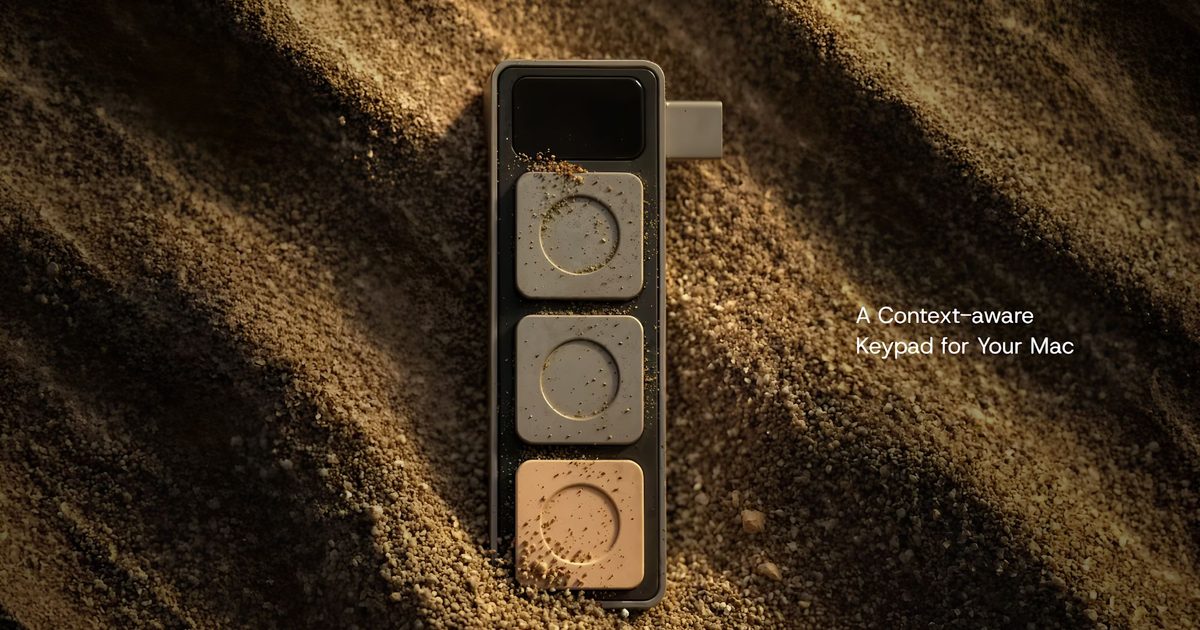
Juggling keyboard shortcuts across video calls, productivity apps, and development tools can be a frustrating experience for MacBook users. A new hardware accessory called Dune, developed by startup Project Mirage, aims to simplify this by adding three programmable buttons that adapt to whatever application is in use. By plugging directly into a USB-C port and drawing power from the laptop, Dune eliminates the need for batteries or separate charging while sitting flush against the side of the MacBook.
The concept of programmable macro keys is not new—devices like the Stream Deck and various gaming keypads have offered similar functionality for years. However, Dune differentiates itself by being designed specifically for MacBooks, with a form factor that matches different laptop models and a companion app that leverages AI for customization. The three buttons can be configured to perform actions such as muting a microphone during a video call, toggling the webcam, copying and pasting text in spreadsheets, or executing commands in development tools like Visual Studio Code or GitHub.
Context-Aware Controls That Adapt to Your Workflow
One of the standout features of Dune is its context awareness. Instead of requiring users to manually switch profiles, the accessory automatically detects which application is currently active and adjusts the button functions accordingly. This is achieved through the companion app, which runs on macOS and monitors the active window. During a Zoom or Google Meet call, the buttons can be set to mute/unmute, turn the camera on/off, and bring the meeting window to the front. In a spreadsheet app like Microsoft Excel or Google Sheets, the same buttons become copy, paste, and undo. Developers can assign actions such as running tests, committing code, or opening specific files in Visual Studio Code.
This automatic switching reduces cognitive load and muscle memory requirements. Instead of memorizing different keyboard shortcuts for each app, users can rely on the three physical buttons to perform the most common tasks. The companion app allows for fine-grained customization, letting users assign not just keyboard shortcuts but also application launches, website openings, or even custom scripts. For power users, this can dramatically speed up repetitive workflows.
AI-Powered Customization with Claude Desktop
Perhaps the most innovative aspect of Dune is its integration with Claude Desktop, an AI assistant from Anthropic. Rather than writing complex Python scripts manually, users can describe the desired shortcut in natural language. For example, a user might say, "When I press button one, open my calendar and create a new event for tomorrow at 10 AM titled 'Team Standup'," and Claude will generate the necessary code and assign it to the button. This makes creating custom workflows accessible to non-programmers while still allowing developers to write advanced automations if they wish.
The AI integration leverages Claude's ability to understand context and generate executable code. According to a demonstration, a user can say, "Set button three to send a Slack message to the general channel saying 'Running late, will be there in 10 minutes'," and the system will produce the script using Slack's API. This capability bridges the gap between physical hardware and software automation, making Dune a uniquely powerful tool for professionals who want to streamline their daily tasks without learning programming languages.
Calendar Integration and Meeting Management
Dune also integrates with the system calendar, allowing it to surface upcoming meetings and events. With a single press, users can join a call, dismiss a reminder, or send a "running late" message to participants. This is particularly useful for heavy meeting schedules where every second counts. The companion app can fetch events from services like Google Calendar or Apple Calendar and display relevant options on the buttons. For instance, if a meeting is about to start, the buttons might change to show "Join Meeting," "Snooze Reminder," and "Send Running Late"—all customized to the specific event.
This kind of proactive assistance is becoming more common in productivity tools, but embedding it into a physical device adds a tactile element that can reduce friction. Instead of clicking through notifications or digging through apps, users can press a button to take immediate action.
Hardware Design and Compatibility
Dune is designed to match the sleek aesthetic of modern MacBooks. It comes in a color and shape that align with the laptop's edge, ensuring a nearly flush fit when plugged in. The device weighs just a few grams and protrudes minimally from the side, making it easy to carry in a laptop bag without adding bulk. It draws power from the USB-C port, so there is no need for internal batteries or charging cables. The three buttons are backlit and provide tactile feedback, ensuring users can feel when a press is registered.
Currently, Dune is compatible with MacBook Air models powered by the M2 chip or newer and MacBook Pro models featuring M1 Pro processors or later. It also requires macOS Sequoia 15 or newer, which means users with older hardware or operating systems will not be able to use the accessory. This limitation reflects the deep integration required for context awareness and AI features, but it may exclude a significant portion of MacBook users who have not upgraded to the latest software.
Pricing and Availability
Dune is available at an introductory price of US$119, after which it will retail for US$149. This positions it between budget macro keypads and premium devices like the Stream Deck XL. Given its specialized design for MacBooks and AI-powered customization, the price may be justified for users who spend hours each day in video calls, spreadsheets, or coding environments. Project Mirage is a small startup, so availability may be limited initially, but the company plans to ship worldwide.
Market Context and Future Potential
The market for AI-assisted productivity tools is expanding rapidly, and hardware accessories like Dune represent a convergence of physical controls and intelligent software. Companies like Elgato, Loupedeck, and others have shown that there is demand for dedicated shortcut devices, but most are general-purpose and require manual configuration. Dune's context awareness and AI integration could set a new standard for how users interact with their computers, especially as remote work and video conferencing remain prevalent.
However, the device faces challenges. The three-button limit may be too restrictive for some power users who need more shortcuts. The reliance on macOS Sequoia and specific Mac models could slow adoption. And the AI customization, while promising, depends on the continued availability and accuracy of Claude Desktop. If the implementation is well-executed and the library of pre-built shortcuts grows, Dune could become a valuable tool for professionals who want to optimize their workflow.
The technology industry has seen many attempts to reinvent the keyboard and mouse. Dune's innovation lies in its simplicity: three buttons that are smart enough to know what you're doing. Whether it becomes a mainstream accessory or remains a niche product will depend on how well it integrates with the evolving ecosystem of productivity apps and AI assistants. For now, it offers a glimpse of a future where physical input devices are as dynamic as the software they control.
Source: Digital Trends News